If you’re here, you’re probably deep in the weeds of industrial automation, and let’s be real—you’ve run into that exact same puzzle: your BECKHOFF Industrial PC is already the beating heart of your production line, and you’ve got a whole fleet of older Modbus sensors, motors, and temperature controllers that you can’t just swap out overnight. The big question, though, is this: Can these two even talk to each other? As a BECKHOFF Industrial PC supplier who’s fielded this question at least a dozen times a week for the past four years, I’m here to cut through the jargon and give you the straight answer. Spoiler: Yes, they absolutely can—and it’s way simpler than you might think. BECKHOFF Industrial PC
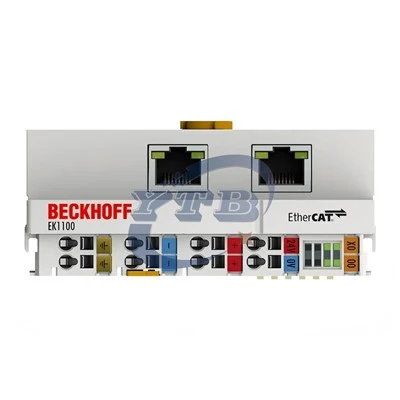
First, let’s get one thing out of the way: BECKHOFF didn’t build their Industrial PCs to work in a silo. Their whole thing is flexibility, right? Most folks hear “Modbus” and think of those boxy, 30-year-old devices that only speak two very basic flavors of the protocol: Modbus RTU (over serial) or Modbus TCP (over Ethernet). BECKHOFF has baked support for both right into their TwinCAT software—the brain of every BECKHOFF Industrial PC, whether it’s a compact C6015 for small machines or a rugged C6640 for heavy-duty processing plants. No extra hardware, no fancy dongles, nothing. That’s the first win here.
Let’s break it down by how you’d actually hook this up, because I know you don’t care about textbook definitions—you care about plugging stuff in and getting data. For Modbus RTU, if your devices are running over RS-485, all you need is a cheap RS-485 adapter (BECKHOFF even sells their own, but off-the-shelf ones work just as well) to plug into your Industrial PC’s USB or serial port. Then, you fire up TwinCAT, jump into the I/O section, and add a Modbus RTU master function block. Wait, function blocks? Yeah, TwinCAT uses those a lot, but don’t let the name scare you—they’re just pre-written code that handles all the messy Modbus communication stuff: polling devices, error checking, picking the right register addresses. You just plug in the Modbus slave address, the register you want, and baud rate, and it does the rest. I’ve had a shop floor guy who’d rather be under a tractor set up a basic RTU link in under an hour last month. That’s not luck—that’s BECKHOFF making this accessible.
Now, Modbus TCP is even easier if you’re working with Ethernet-connected Modbus devices. A lot of newer Modbus gear runs over Ethernet, so you don’t need that RS-485 adapter at all. Just plug your Modbus devices and your BECKHOFF Industrial PC into the same network switch, then add a Modbus TCP client function block in TwinCAT. The only stuff you need here is the IP address of each Modbus device and its port number (usually 502, the standard for Modbus TCP). I once helped a food processing plant connect 12 Modbus temperature sensors to their C6515 Industrial PC to track oven temperatures—we had data streaming to their HMI in 20 minutes flat, no headaches. The worst part was just finding the right IPs for each sensor, which any electrician can do via a quick scan of the network.
But let’s talk about the fine print, because nothing in industrial automation is ever 100% smooth. The number one mistake I see folks make is thinking all Modbus devices are the same. Wait, a second—Modbus is a “open” protocol, right? The basic rules are universal, but different manufacturers (even the older ones) sometimes tweak things. Like, some Modbus devices hold their data in input registers, others in holding registers, and a few use discrete inputs. If you grab the wrong register type, your BECKHOFF PC will pull garbage data instead of temperature readings. That’s not a BECKHOFF problem—that’s just how Modbus works. The fix? Most device manuals have a Modbus register map, so you just copy that into the TwinCAT function block. It’s like following a recipe, not coding from scratch. I can’t tell you how many times a client has called panicking because their pressure gauge data was wrong, and it turned out they’d grabbed a discrete input instead of a holding register. Ten-minute fix, no stress.
Another thing to keep in mind: BECKHOFF’s Industrial PCs handle multiple Modbus connections at once. You don’t have to pick between Modbus RTU and Modbus TCP—you can run both on the same machine, even connect multiple Modbus buses. Need to link 8 Modbus RTU sensors on one serial line and 5 Modbus TCP motor controllers on the network? No problem. The Industrial PC’s CPU will handle all the polling, so you won’t get lag unless you’ve got way too many devices crammed into a single line (and even then, you can split the bus with a cheap RS-485 hub). I’ve got a client in automotive manufacturing who runs 42 Modbus devices on their C6030 PC, and it’s never missed a data point in two years. That’s the reliability BECKHOFF is known for.
Wait, what if you’ve got a super old Modbus device, the kind that only runs at 9600 baud over a 2-wire RS-232 link? Can that talk to BECKHOFF too? Absolutely. BECKHOFF Industrial PCs still have RS-232 ports on many models (or you can get a $10 adapter from USB to RS-232) and TwinCAT supports Modbus RTU over RS-232 just as well. I installed a system for a paper mill last year that connected a 1998 Modbus flow meter to their new C6650 PC, and it was up and running before lunch. No retrofitting, no replacing gear that works fine. That’s a huge win for anybody working on a tight budget who doesn’t want to rewrite their entire automation stack.
Let’s also address the elephant in the room: why would you even want to do this? Why not just ditch Modbus and go all BECKHOFF I/O modules? Fair question, but let’s be real—most automation teams can’t replace every device at once. You’ve got a production line that’s paid for itself over 10 years, and swapping a $200 Modbus sensor for a $500 BECKHOFF analog input module just doesn’t make financial sense, especially if the sensor is still accurate. Using BECKHOFF’s Industrial PC to bridge the gap means you get to keep your existing hardware, leverage your BECKHOFF investment, and still get all the benefits of a modern control system: real-time data, easy HMI setup, remote monitoring, and stuff like predictive maintenance. I’ve seen companies cut their downtime by 30% just by connecting old Modbus gear to their BECKHOFF PC—no new hardware, just a little configuration.
Now, let’s talk about a common misconception. Some folks think they need to be a TwinCAT expert to make this work. Nah, not even close. BECKHOFF has a ton of free resources: YouTube tutorials that walk you through setting up a Modbus link in 10 minutes, sample code in TwinCAT that you can copy-paste and tweak, and a support team that’s actually pretty quick to answer questions. I’ve had clients with zero TwinCAT experience get their Modbus link running in a day, just by following a basic tutorial. And if you get stuck, I’m here to help—seriously, as a supplier, I offer free 15-minute calls to walk through setup issues, no strings attached. That’s not something every industrial component vendor does, but BECKHOFF’s whole model is built on supporting their customers, not just selling hardware.
Wait, what about security? I know a lot of industrial teams are worried about connecting older, unsecure Modbus devices to a network, and rightfully so. BECKHOFF’s Industrial PCs let you set up your Modbus connections in a segmented network, so the Modbus devices are on a separate VLAN that can’t access your main control network. You can also enable Modbus TCP encryption if you’re working in a regulated industry like pharmaceuticals or food processing. It’s not a free pass, but it’s way more secure than just leaving old Modbus devices hanging on an unprotected network. That’s a big point I don’t see brought up enough—BECKHOFF doesn’t make you choose between connectivity and security.
Let’s wrap this up with a real example, because stories stick better than specs. Last quarter, a small custom machine shop hit me up because they had a BECKHOFF C6015 PC they’d used to build a new CNC machine, and their old, well-used Modbus spindle motor wouldn’t talk to it. They were ready to spend $1,200 on a new BECKHOFF motor controller, but I told them to grab a $15 RS-485 adapter and follow a 2-minute TwinCAT sample for Modbus RTU. They did it, and when we checked the next day, the spindle speed was showing up perfectly on their HMI. They saved over a grand, and their machine was running a week earlier than planned. That’s the kind of win this setup delivers.
So, to circle back to the original question: Can BECKHOFF Industrial PCs communicate with Modbus devices? Yes, absolutely—no extra hardware required, no super specialized coding, and it works with every common Modbus flavor out there. Whether you’ve got old RS-232 gear, modern Ethernet Modbus TCP, or a mix of both, your BECKHOFF PC can bridge the gap without breaking the bank or your schedule.
Now, if you’re in the middle of a project where you need to connect Modbus devices to a BECKHOFF Industrial PC, or you’re not sure which model fits your needs, I’m here to help. We can talk through your setup, answer questions about adapters or TwinCAT configuration, and make sure you’re not overspending on hardware you don’t need. Don’t waste time troubleshooting on your own when a quick chat can get you up and running. Reach out to us to connect and discuss your specific requirements.
Siemens PLC Controller References
- Beckhoff Automation GmbH. (2023). TwinCAT 3 Function Block Library: Modbus RTU and Modbus TCP Documentation.
- Modbus Organization. (2022). Modbus Protocol Specification V1.1b.
- Industrial Automation Manufacturers Association. (2021). Best Practices for Integrating Legacy Modbus Devices with Modern Industrial Control Systems.
- Beckhoff Automation. (2023). C-Series Industrial PC Datasheets for Compact and Rugged Automation Applications.
Yuntengbao Automation (Xiamen) Co., Ltd.
We are one of the most professional beckhoff industrial pc manufacturers and suppliers in China, featured by quality products and good price. Please rest assured to buy durable beckhoff industrial pc in stock here from our factory. Contact us for more details.
Address: Room 013, 4th Floor, No. 606-4, Xinglong Road, Huli District, Xiamen City, Fujian Province, China
E-mail: lrene@plcsupplychain.com
WebSite: https://www.plc-supplychain.com/
