If you’ve ever worked with CNC turn mill parts, you know that skipping the right design software is a fast track to wasted materials, delayed production, and frustrating miscommunication between your design team and machine operators. As someone who’s been supplying custom turn mill parts for over 7 years, I’ve tested more design tools than I can count—some that made me want to tear my hair out, and a few that stuck around because they actually fit the unique needs of turn mill machining. Let’s break down what I look for (and what I’ve seen work for our clients) when picking software for turn mill parts, and the best tools out there right now. CNC Turn Mill Parts

First, let’s get one thing straight: turn mill parts aren’t your standard lathe or mill pieces. They combine both turning (rotating the part while cutting) and milling (stationary tools cutting shapes) on one machine, so your software needs to handle both workflows seamlessly. No awkward switching between two programs, no weird post-processor errors that make your machine spit out a bad part mid-job. That’s non-negotiable for us, because even a small error on a prototype can cost our client weeks of wait time and thousands in material.
Let’s start with the top pick for most of our projects: Fusion 360. I know, a lot of machinists roll their eyes at Autodesk tools, but Fusion 360 changed the game for turn mill work. It’s cloud-based, so you can access designs from any laptop at the shop, and the turn mill module is actually built right in—not an afterthought add-on that’s buggy. For example, last quarter we had a client needing a custom hydraulic valve body that required turning a 2-inch diameter aluminum blank, then milling six offset slots, followed by a secondary turning operation to taper one end. With Fusion 360, I modeled the part in 20 minutes, dragged and dropped turn and mill toolpaths into the same timeline, and the post-processor generated code that our 2-axis turn mill machine ran perfectly on the first try. No reworks, no extra setup time.
The best part? It’s not just for big companies. We’re a small to mid-sized supplier, and Fusion 360’s free tier for hobbyists and small businesses lets us handle low-volume prototype jobs without paying a monthly fee. The $60/year paid tier unlocks more advanced toolpaths (like live tooling for complex milling features) and collaborative tools, which is great when our design team and shop floor guys need to comment on a design without passing a USB drive back and forth. The only downside? If you’re running super high-volume, 5-axis turn mill jobs, it’s a little less robust than some dedicated CAM tools, but for 90% of the custom parts we make, it’s overkill in the best way.
Next up, if you’re working with larger, more complex parts (think 10-inch blanks with multiple live tool stations), Mastercam is the go-to for most machine shops, including ours for high-volume runs. Mastercam’s Turn Mill module has been around for decades, so it’s got every trick in the book—from custom post-processors for niche turn mill machines (we run a Tsugami machine that only works with Mastercam’s specific post) to simulation tools that let you watch the entire cutting process before you even load a blank. I used to dread programming high-volume bracket jobs because I’d have to account for tool collisions; with Mastercam’s simulation, you can lock tools, adjust clearances, and catch a collision that would’ve ruined a $50 steel blank before it ever hit the machine. It’s a little pricier—around $50/month for the basic Turn Mill package, and more for advanced features—but the reliability is worth it if you’re doing 50+ of the same part a month.
That said, Mastercam has a steep learning curve. I had a new designer on our team last year who spent two weeks just getting the hang of the turn mill toolpaths, whereas Fusion 360 took her half a day. If you’re a small shop with a tight turnaround time for prototypes, Mastercam might be overkill, but if you’re scaling up production, it’s hard to beat.
Now, let’s talk about the wild card: SolidWorks CAM. Wait, I know what you’re thinking—SolidWorks is a CAD tool, not a CAM tool. But SolidWorks CAM integrates directly with the SolidWorks modeling software most designers already know. If your team is used to designing parts in SolidWorks and doesn’t want to jump to a whole new platform, SolidWorks CAM’s Turn Mill module is a solid middle ground. We used it a couple of times for a client that needed 30 custom adapter parts, because the design team already had the SolidWorks files ready. We could import the design straight into SolidWorks CAM, add turn and mill toolpaths in an hour, and get the job out in two days. It’s cheaper than Mastercam (around $30/month) and has way less of a learning curve for anyone who’s used SolidWorks. The catch? It’s not as robust for super complex live tooling jobs. We tried it once for a part that needed 12 different milled features, and it kept throwing errors when trying to sync turning and milling operations. So it’s great for simple to medium complexity, but not for the crazy stuff.
Wait, should we mention the ones to avoid? Yeah, let’s be real. A lot of machinists swear by old-school tools like CAMWorks, but wait—CAMWorks is actually part of SolidWorks now, right? No, the one to skip is old, standalone turn mill tools that don’t integrate with your CAD model. I used a clunky tool called GibbsCAM for a job a few years back, and I had to re-model the entire part from scratch because the CAM software couldn’t read the original SolidWorks file. That’s a huge waste of time, and we almost missed a deadline because of it. Also, don’t sleep on post-processors—no matter which software you pick, make sure it works with your specific turn mill machine. A post-processor that’s generic will give you code that’s off by a fraction of a millimeter, which is enough to ruin a $100 titanium part.
So, how do I pick which one is right for you? Let’s break it down by your needs. If you’re a small supplier like us, doing mostly prototypes and low-volume runs, Fusion 360 is the best bang for your buck. If you’re doing high-volume production with complex machines, Mastercam pays for itself in less downtime. If your team lives and breathes SolidWorks, SolidWorks CAM is the middle ground that won’t make you re-learn everything.
As a turn mill parts supplier, I also test these tools for something else: how easy it is to communicate designs with clients. A lot of our clients don’t have their own design software, so we send them 3D views and simulation videos of the part being cut. The tools that make that easy—like Fusion 360’s share links, Mastercam’s simulation exports—are a huge win for our clients, because they can see exactly what their part will look like before we even cut metal. That cuts down on change orders and makes the whole process way smoother.
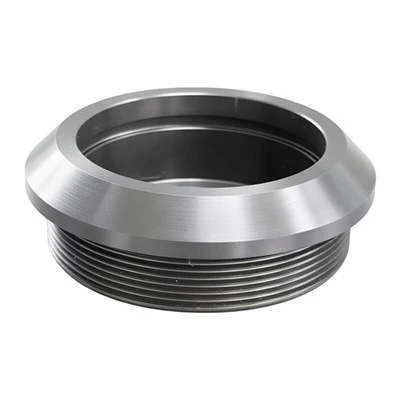
If you’re tired of dealing with software that causes delays, bad parts, or headaches, I get it—we’ve been there. But picking the right design tool isn’t just about programming; it’s about getting your parts right, on time, and without extra costs. If you’re looking to work with a supplier that uses these tools to make your turn mill parts perfect, hit me up. We’ve got the experience, the machines, and the software to handle anything from a single prototype to a 1000-part high-volume run. We’ll walk you through the design process, show you how the toolpaths work, and make sure your parts are exactly what you need.
Farm Implement Metal Parts References
- Autodesk. (2024). Fusion 360 Turn Mill Module User Guide.
- Mastercam Inc. (2023). Turn Mill Machining Best Practices for Production Shops.
- Dassault Systèmes. (2024). SolidWorks CAM Integration Guide for Turn Mill Applications.
- The Fabricator. (2023). "CAM Software Selection for Turn Machining: Key Considerations for Job Shops".
Suzhou Yehe Precision Stamping Co., Ltd.
With abundant experience, we are one of the most reliable CNC turn mill parts manufacturers and suppliers in China. We warmly welcome you to buy customized CNC turn mill parts at competitive price from our factory. If you have any enquiry about quotation, please feel free to email us.
Address: No.5, Beifang Road, Changshu City, Suzhou, Jiangsu Province, China.
E-mail: szyh06@yehejingmi.com
WebSite: https://www.yehe-precision.com/
